Top Picks & Buying Advice
SECTION 1 — INTRODUCTION
Lower back pain builds slowly. At first it feels like stiffness. Then it turns into daily discomfort that follows you even after you leave your desk.
If you sit 6–10 hours a day, your chair is either protecting your spine or quietly working against it.
The right ergonomic chair doesn’t just feel comfortable. It reduces spinal compression, supports your natural lumbar curve, and prevents muscle fatigue from building throughout the day.
In this guide, we’ll break down what actually relieves lower back pain and show you the chairs that deliver real support — not just marketing claims.
As an Amazon Associate, I earn from qualifying purchases. Prices and availability are subject to change.
An ergonomic chair designed with proper lumbar support, adjustable seat depth, and stable recline can significantly reduce daily stress on your lower back. But not all ergonomic chairs are equally supportive.
If you struggle with stiffness, soreness, or pressure in your lower spine after sitting for several hours, choosing the right ergonomic chair can make a noticeable difference in daily comfort and long-term posture.
In this guide, we break down what actually helps relieve lower back pain and highlight chairs that provide the right balance of support, adjustability, and long-term comfort.
SECTION 2 — What to Look for in a Chair for Lower Back Pain
Adjustable Lumbar Support
The lumbar region is the natural inward curve of your lower spine. A good chair should support this curve without pushing you forward unnaturally. Adjustable lumbar support allows you to position the support exactly where your back needs it.
The closer the lumbar support aligns with the natural inward curve of your spine, the less muscle fatigue builds throughout the day.
Fixed lumbar bumps often miss the mark.
Seat Depth Adjustment
If the seat is too deep, it pushes you forward and prevents your back from resting fully against the backrest. If it’s too shallow, it fails to support your thighs.
Ideally, you should have two to three fingers of space between the seat edge and the back of your knees.
Firm but Supportive Cushioning
Too soft and you sink.
Too firm and pressure builds.
Look for dense foam or supportive mesh that keeps your pelvis stable without collapsing over time.
Recline with Tension Control
Your lower back needs micro-movement during the day. A chair with tilt tension control allows you to lean slightly without losing lumbar contact.
Locked upright seating increases fatigue.
SECTION 3 — How Severe Is Your Lower Back Pain?
Mild daily stiffness may only require adjustable lumbar height and a supportive cushion.
Chronic or recurring pain may require deeper lumbar contouring and adjustable recline tension to reduce spinal compression.
Matching the chair to your level of discomfort is more important than choosing the most expensive option.
How We Evaluated These Chairs
Not every chair labeled “ergonomic” actually provides meaningful lower back support. For this guide, we focused on features that directly impact lumbar strain during prolonged sitting rather than cosmetic design or marketing claims.
Each chair was evaluated using the following criteria:
Lumbar Adjustability and Support Depth
Chairs were evaluated based on whether lumbar support could be adjusted in height, depth, or both.
Seat Depth & Pelvic Positioning
The lumbar region of the spine has a natural inward curve. When that curve is unsupported, surrounding muscles compensate, leading to fatigue and stiffness.
We prioritized chairs that allow adjustment in lumbar height, depth, or both. The more precisely the lumbar support can be aligned with your natural spine curve, the more effectively it reduces sustained pressure on the lower back.
Chairs with fixed lumbar bumps were rated lower than those offering customizable positioning.
Seat Depth and Pelvic Alignment
Proper seat depth plays a major role in spinal posture. If the seat is too deep, users tend to slide forward, losing back support. If it is too shallow, it fails to distribute weight evenly across the thighs.
Chairs with adjustable seat depth scored higher because they allow users to maintain full back contact while keeping a small gap between the seat edge and the back of the knees. This helps keep the pelvis in a neutral position, which reduces stress on the lumbar spine.
Recline Mechanism and Tension Control
The spine is not designed to remain rigid for hours. Micro-movements throughout the day reduce compression and improve circulation.
We evaluated how smoothly each chair reclines and whether the tension can be adjusted. Chairs that maintain lumbar contact while reclining were prioritized, as this prevents subtle slouching that often contributes to lower back discomfort.
Cushioning and Weight Distribution
Seat cushioning influences how weight is distributed across the hips and pelvis. Extremely soft cushions can cause sinking and posterior pelvic tilt, while overly firm surfaces can create pressure points.
We looked for chairs with dense foam or structured mesh that maintains support over time rather than collapsing with prolonged use.
Long-Term Durability and User Feedback Patterns
Beyond technical specifications, we examined consistent feedback patterns from long-term users. We prioritized chairs known for maintaining structural integrity and lumbar performance after extended daily use.
Chairs that frequently lost tension, flattened cushions, or developed instability over time were not considered strong recommendations.
SECTION 4 — Quick Picks Summary
Best Ergonomic Chairs for Lower Back Pain (Quick Summary)
• Best Overall: SIHOO M57 — Balanced lumbar adjustability and comfort
• Best Premium: Steelcase Series 1 — Advanced ergonomic design and durability
• Best Budget: Hbada — Basic lumbar support at an accessible price
• Best for Tall Users: Duramont — Deeper lumbar customization and wider seat base
Choosing the right chair early can prevent years of avoidable lumbar strain.
Scroll down for detailed breakdowns and who each chair is best suited for.
| Chair | Lumbar Adjustability | Best For | Price Tier |
| SIHOO M57 | Height adjustable | Balanced support for most users | Mid-range |
| Steelcase series 1 | Contoured lumbar support | Premium long-term ergonomic use | High |
| Hbada | Basic lumbar contour | Budget / moderate use | Low |
| Duramont | Height + depth adjustable | Tall users / extended sitting | Mid–High |
Scroll down for detailed breakdowns, real-world comfort analysis, and direct pricing links.
SECTION 5 — Product Sections
Best Overall: SIHOO M57 Ergonomic Office Chair
Best For: Most users who want adjustable lumbar support and strong comfort without paying premium pricing.
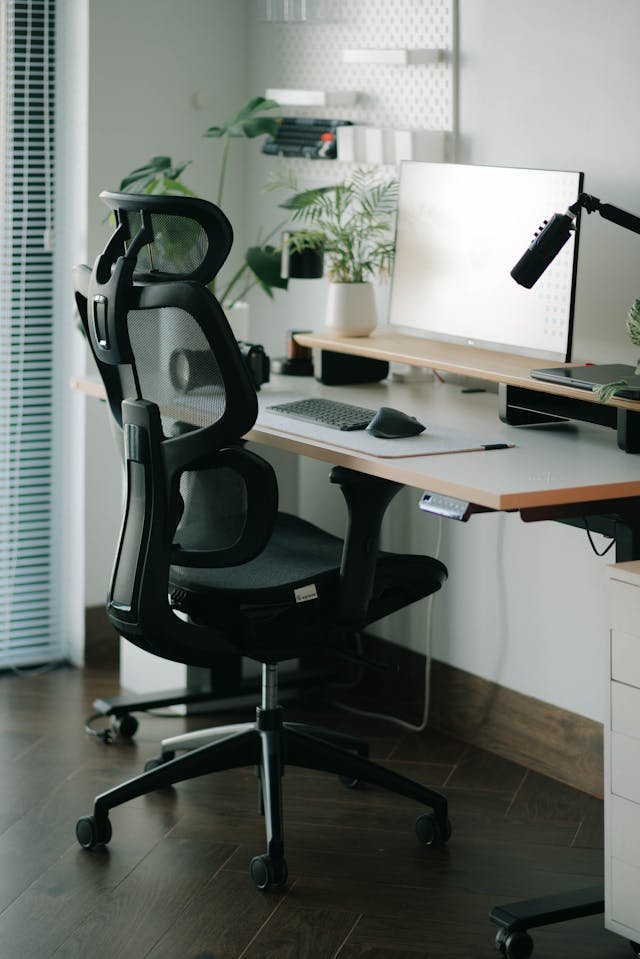
The SIHOO M57 stands out for its adjustable lumbar support system and breathable mesh backrest. It allows height adjustment of the lumbar support, helping users position support exactly at the lower spine curve.
Pros:
- Adjustable lumbar height
- Breathable mesh design
- Stable recline with tilt lock
- Good value for mid-range pricing
Cons:
- Seat cushion may feel firm initially
- Armrests have limited forward/back adjustment
See today’s price and shipping options.
Why it helps lower back pain: This makes it especially suitable for users with recurring lower back discomfort who prioritize long-term ergonomic support.
The adjustable lumbar feature allows precise positioning, which is critical for reducing sustained pressure on the lower spine during long sitting sessions.
Best Budget: Hbada Ergonomic Office Chair
Best For: Budget-conscious users or smaller spaces that need basic lumbar support for moderate daily use.
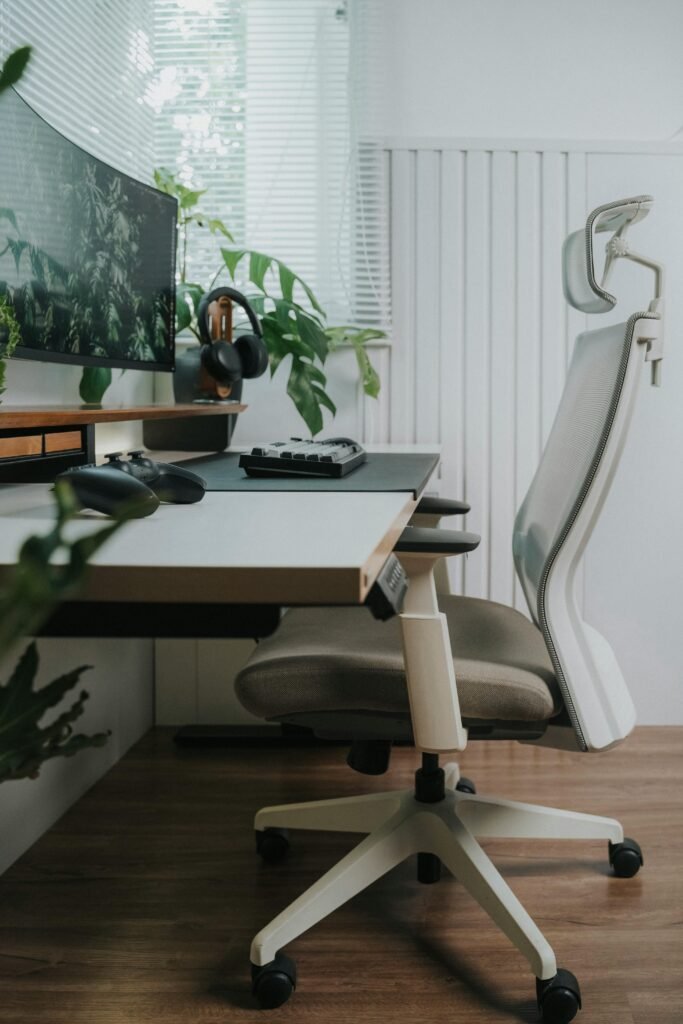
This chair offers a compact frame with basic lumbar support and a breathable backrest. It works well for smaller spaces and lighter daily use.
Pros:
- Affordable price point
- Compact design
- Breathable back support
Cons:
- Limited lumbar adjustability
- Not ideal for extended 10+ hour sessions
See today’s price and shipping options.
Why it helps lower back pain: For short to moderate work sessions, it provides enough back contour to prevent slouching without requiring a large investment.
Best Premium: Steelcase Series 1
Best For: Professionals who sit 8+ hours daily and want long-term premium lumbar support with advanced adjustability.
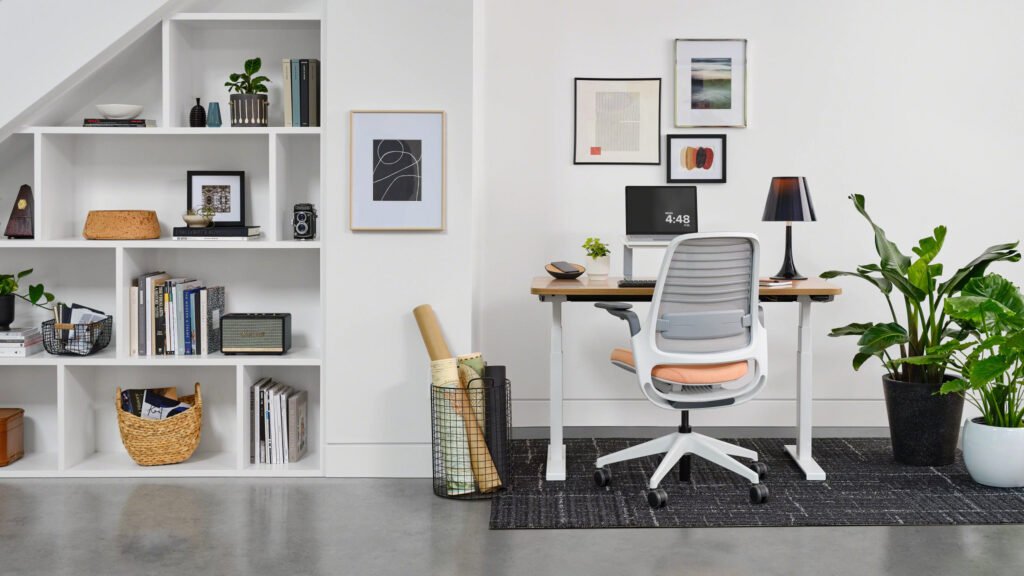
The Steelcase Series 1 is designed for users who prioritize long-term ergonomic performance and build quality. Known for its contoured backrest and durable construction, this chair is often chosen by professionals who spend extended hours at a desk. Its structured lumbar support system makes it especially appealing for users managing recurring lower back discomfort.
Pros
- Contoured lumbar support that follows the natural spine curve
- Durable build quality for long-term daily use
- Smooth recline with tension control
- Adjustable seat depth for better body fit
Cons
- Higher cost than typical mid-range chairs
- Firmer seat cushion may not suit everyone
See today’s price and shipping options.
Why it helps lower back pain
Steelcase’s contoured lumbar design maintains support even when you lean back, preventing subtle slouching that contributes to lumbar strain. The adjustable seat depth helps position your pelvis correctly, which reduces pressure buildup in the lower spine during extended work sessions.
Best for Tall Users: Duramont Ergonomic Adjustable Office Chair
Best For: Taller users or those needing deeper lumbar customization for extended work sessions.
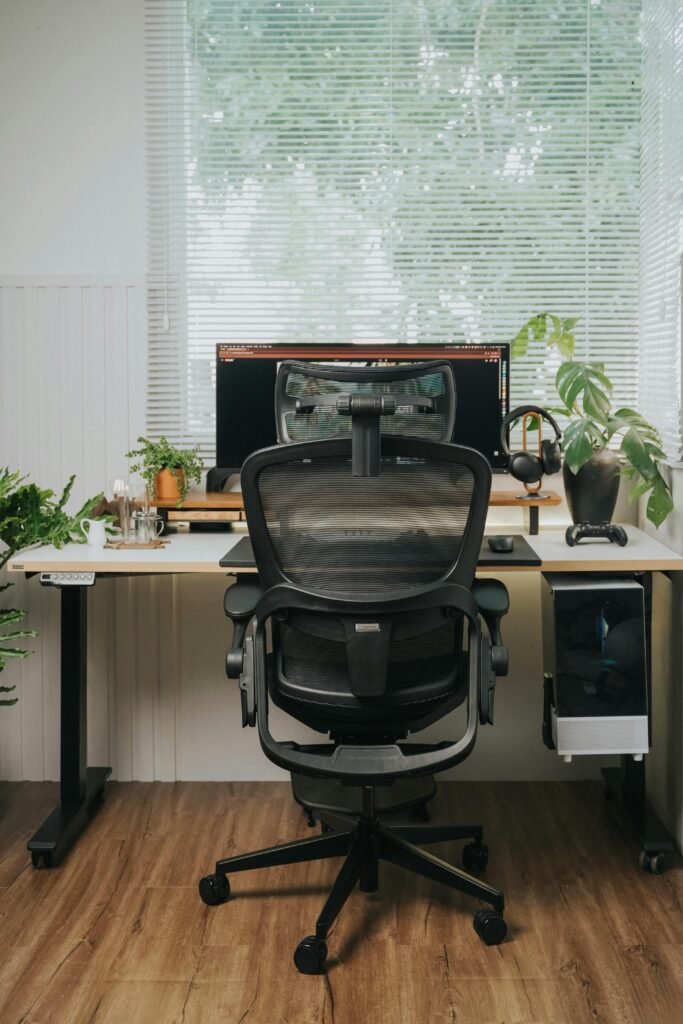
The Duramont Ergonomic Adjustable Office Chair offers deeper lumbar customization than many mid-range chairs. With both height and depth adjustment, it allows users to fine-tune lower back support based on body type and sitting habits. Its wider seat and supportive cushioning make it particularly suitable for taller individuals or those working long hours daily.
Pros
- Lumbar support adjustable in height and depth
- Thick supportive cushion for comfort in long sessions
- Headrest included for upper spine support
- Wider seat base for taller or larger users
Cons
- Larger footprint requires more floor space
- Slightly higher mid-range pricing
- Recline tension can feel stiff until customized
See today’s price and shipping options.
Why it helps lower back pain
The combination of height and depth lumbar adjustability lets taller users align the support exactly where their spine needs it most. A thicker cushion and wider base help distribute weight evenly, reducing pelvic pressure that can lead to lower back strain. The added headrest also encourages a healthier overall spinal posture.
SECTION 6 — Sitting Tips for Lower Back Relief
Even the best chair cannot compensate for poor posture habits.
• Keep feet flat on the floor
• Avoid crossing legs
• Maintain 90–100 degree knee angle
• Sit fully back against lumbar support
• Change position every 30–45 minutes
For a full posture breakdown, see our guide on how to sit properly for long work hours.
SECTION 7 — FAQ
Are ergonomic chairs good for sciatica?
They can help by improving spinal alignment and reducing prolonged nerve compression. However, severe cases may require medical evaluation.
Is a firm chair better for lower back pain?
Generally, medium-firm support works best. Extremely soft cushions can cause the pelvis to tilt backward, increasing lumbar strain.
Do lumbar cushions work?
External lumbar cushions can help temporarily, but chairs with built-in adjustable lumbar support offer better long-term stability.
Can an ergonomic chair cure lower back pain?
An ergonomic chair cannot cure lower back pain, especially if the pain is caused by injury, nerve compression, or underlying medical conditions. However, it can significantly reduce daily strain on the lumbar spine by supporting proper alignment and minimizing prolonged pressure on spinal structures.
Many cases of lower back discomfort are aggravated by poor posture and unsupported sitting. A chair with adjustable lumbar support, proper seat depth, and controlled recline can help maintain a neutral spine position, which reduces muscle fatigue and compression over time.
If lower back pain is severe, persistent, or worsening, medical evaluation is recommended. An ergonomic chair should be viewed as part of a broader strategy that may include posture correction, movement breaks, and professional care when necessary.
How long does it take to notice improvement after switching to an ergonomic chair?
Most people begin to notice reduced muscle fatigue and improved comfort within one to two weeks of consistent use. However, the adjustment period varies depending on posture habits and how long poor sitting patterns have been present.
During the first few days, the chair may feel different or even slightly firm as your body adapts to improved alignment. This is normal. As posture stabilizes and muscles no longer compensate for unsupported sitting, many users report less stiffness at the end of the workday and fewer flare-ups of lower back discomfort.
For best results, combine the chair with proper sitting posture and regular movement breaks every 30 to 45 minutes.
Final Verdict: Which Chair Is Best for Lower Back Pain?
If you want the safest overall choice with adjustable lumbar support and strong daily comfort without premium pricing, the SIHOO M57 is the best balance for most users.
If you sit 8–10 hours per day and want long-term durability with refined ergonomic engineering, the Steelcase Series 1 is the better long-term investment.
If budget is your main constraint or you work in a compact space, Hbada provides basic lumbar contour support at a lower cost.
For taller users who struggle to align lumbar support correctly, the Duramont offers deeper adjustability that makes a noticeable difference in long sessions.
The best chair is the one that matches how long you sit and how much lumbar customization you need.
FINAL CTA
If you want a broader comparison of our top recommendations, see our full Best Ergonomic Chairs guide here.